
Overview
Buyer Interest Search introduces two powerful new tools: the ability to gauge buyer interest and develop pricing strategies before a property comes to market, and the ability to identify and connect with agents representing customers who match on-market exclusives.
Both scenarios draw from the complete network of saved buyer searches across all RealPlus system users.
How it Works
Pre-Market Demand
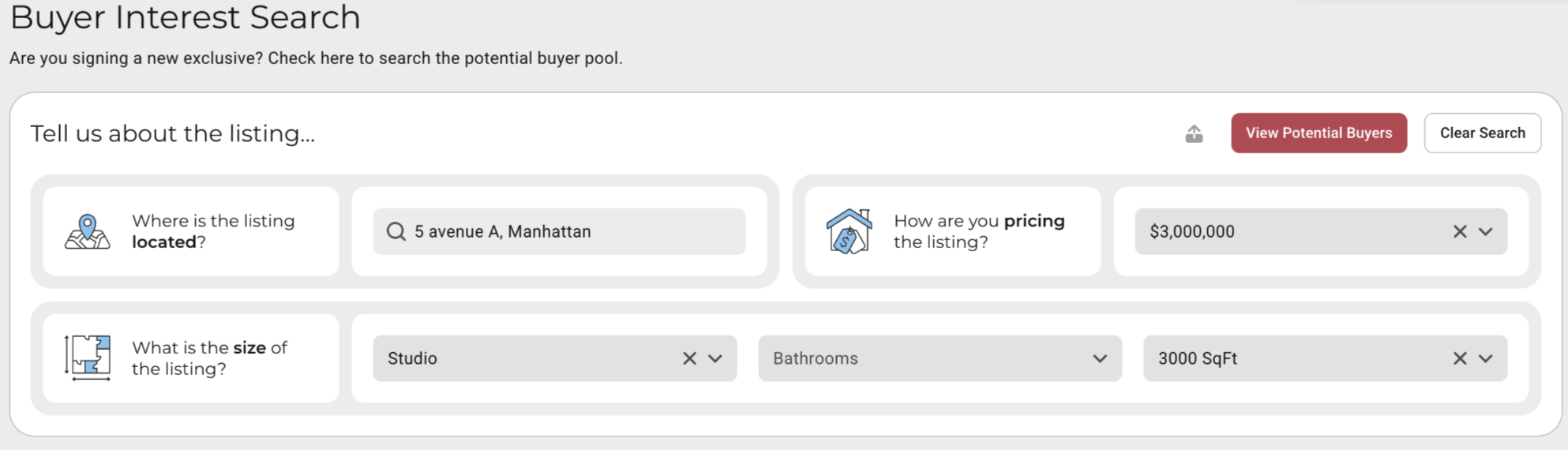
An agent preparing to take a listing to market uses Buyer Interest Search to run a quick demand check. They enter the property address, room count, approximate square footage, and expected price. No listing needs to exist yet. The search is purely exploratory.
The system returns the number of active saved searches in the RealPlus network that would match, giving the agent a data point to support their pricing conversation with the seller. Additionally, agents who have opted into visibility appear by name — indicating they have a qualified buyer and welcome contact if the listing were to come to market.
Reverse Prospecting on Active Listings
For an Exclusive listing already on the market, the listing agent can see how many buyer searches in the system match the property. Among those, agents who have opted into visibility appear by name — indicating they have a qualified buyer and welcome contact.
Agents who have opted out are not identified, but their clients’ searches are still included in the match total — keeping the overall count accurate.
Getting Started
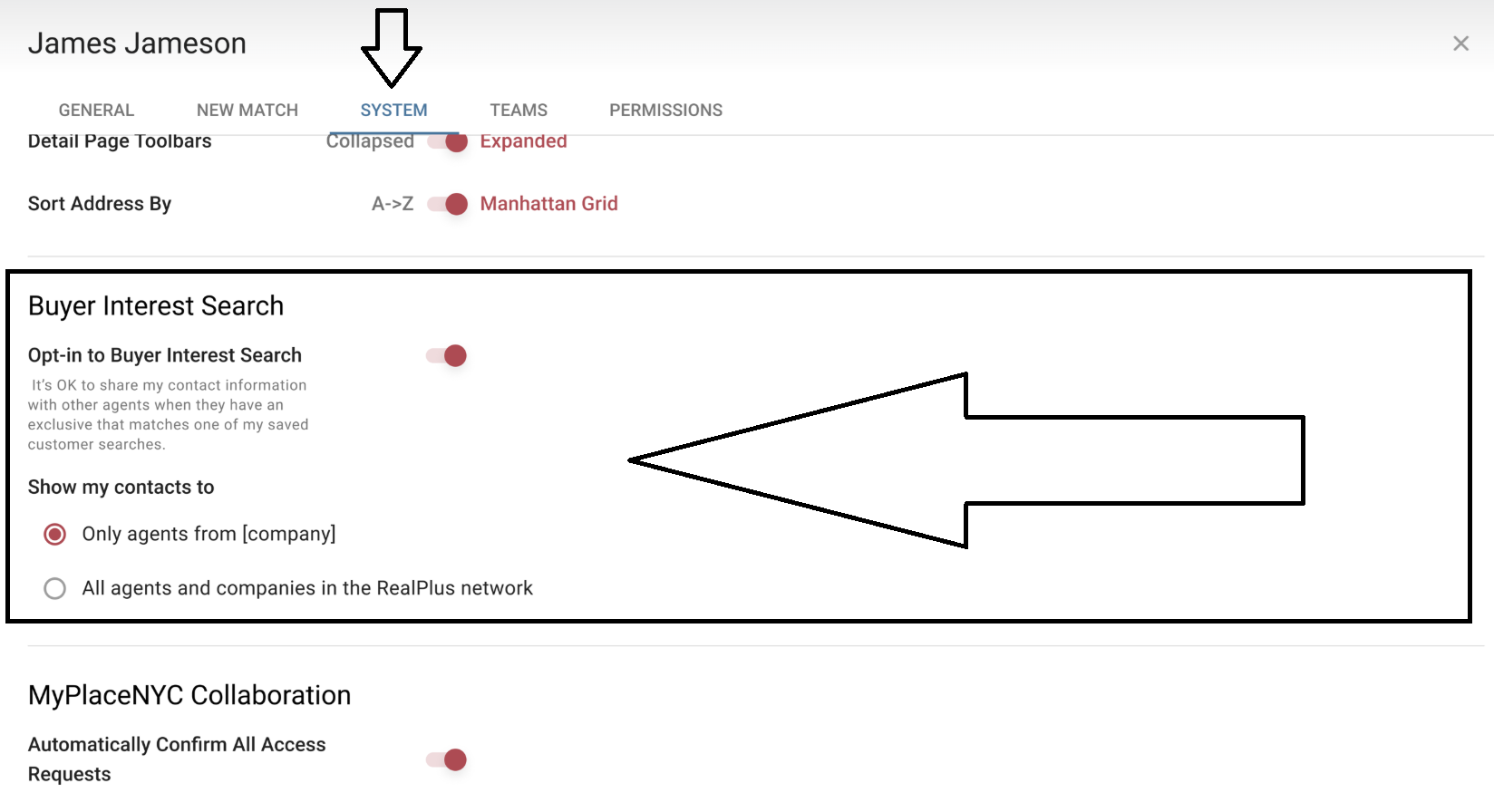
The first step in taking advantage of these tools is to review your contact settings for all of your existing and future saved customer searches. This is managed in your profile’s system settings.
To ensure that you are able to immediately maximize the benefits of these tools across the entire RealPlus user network, system defaults are set to:
- OPT IN: It’s OK to share my contact information with other agents when they have an exclusive that matches one of my saved customer searches.
- SHARE MY CONTACT INFORMATION WITH: All agents and companies in the RealPlus network.
At any time, you can opt out of sharing your contact information completely or limit exposure to only agents within your own firm.
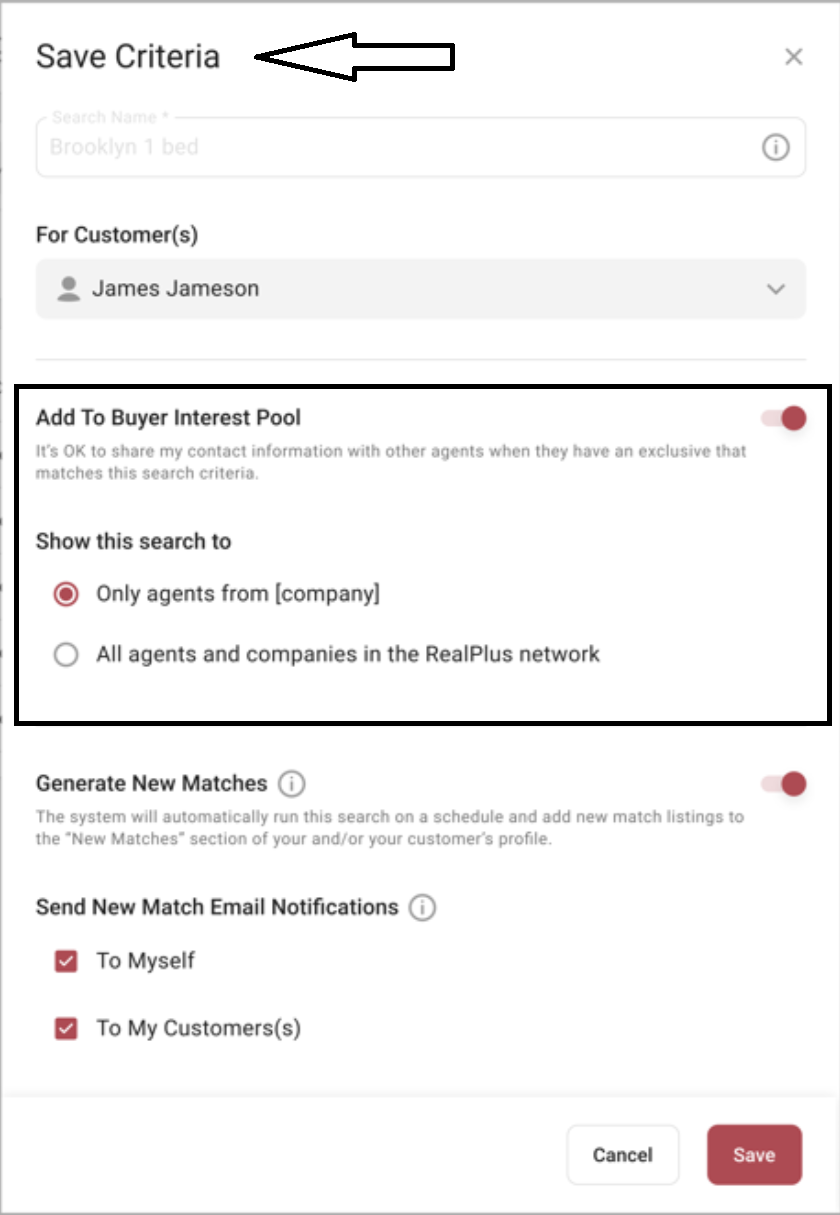
Important to note: This setting can be adjusted on a per-search basis. The default selection simply establishes your starting point and the preferred setting you expect to use most of the time. If a specific search requires special handling, you can make this adjustment when saving the search. You can also return to edit your choice at any time.
Finding the Tools
There are two Buyer Interest components:
- Searching for potential Buyer Interest for Exclusives not yet listed
- Viewing Buyer Interest for an existing Exclusive
Not-Yet-Listed
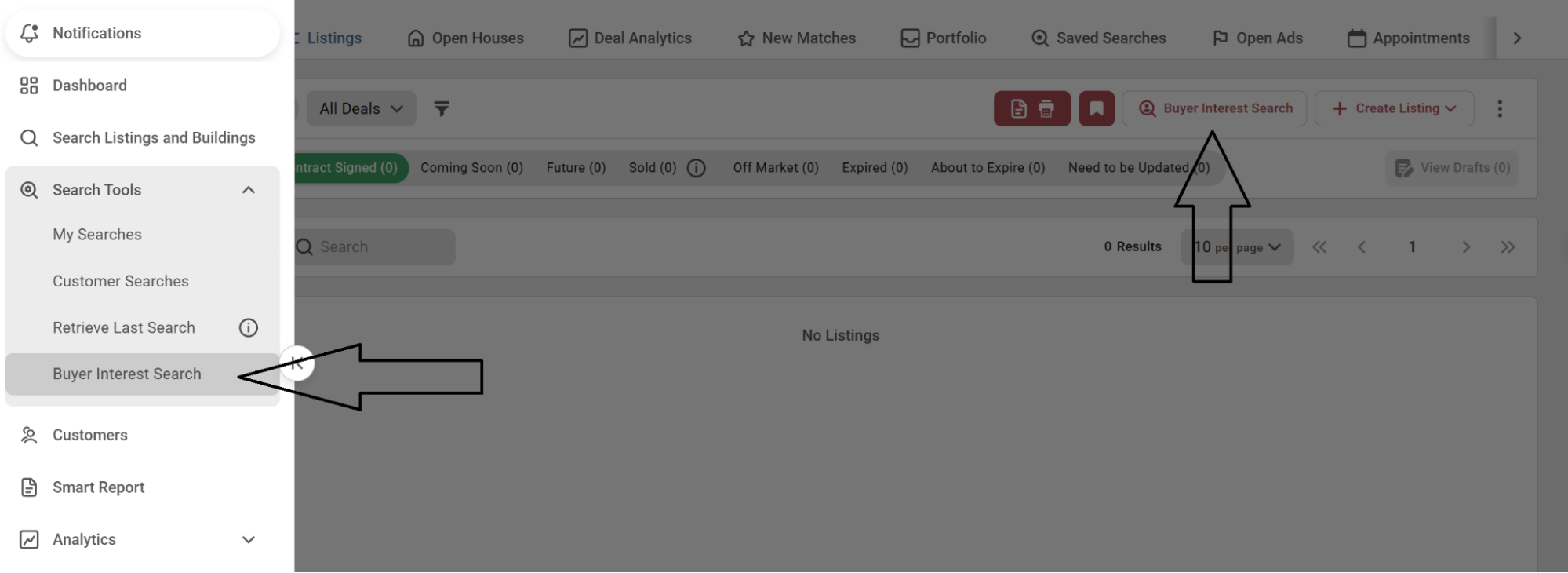
To view Buyer Interest stats for the purpose of preparing to list or pitch an exclusive, look for the option to launch the tool in the “Search Tools” navigation menu or as a call-to-action option within the “My Listings” tab of your Agent Profile.
Once launched, you will be presented with input fields for the listing’s address, unit, price, and size. Potential buyers will be matched against this information. Changing any attribute will adjust the matching pool accordingly.
Exclusive Listings
To view Buyer Interest stats for an existing Exclusive, along with contact information for agents who have customers who are potential matches, refer to the listing’s detail page and the tab “Listing Interest”.
Here you will find all your customers’ activity history, listing statistics, and the new Buyer Interest feature.
Breakdown of Results
Whether you use the tool for the purpose of preparing or pitching for a listing not-yet-on-the-market, or use it to understand how a current Exclusive is performing, the results provide you with two distinct sets of data:
- Interested Buyers
- Potential Buyers
Interested Buyers
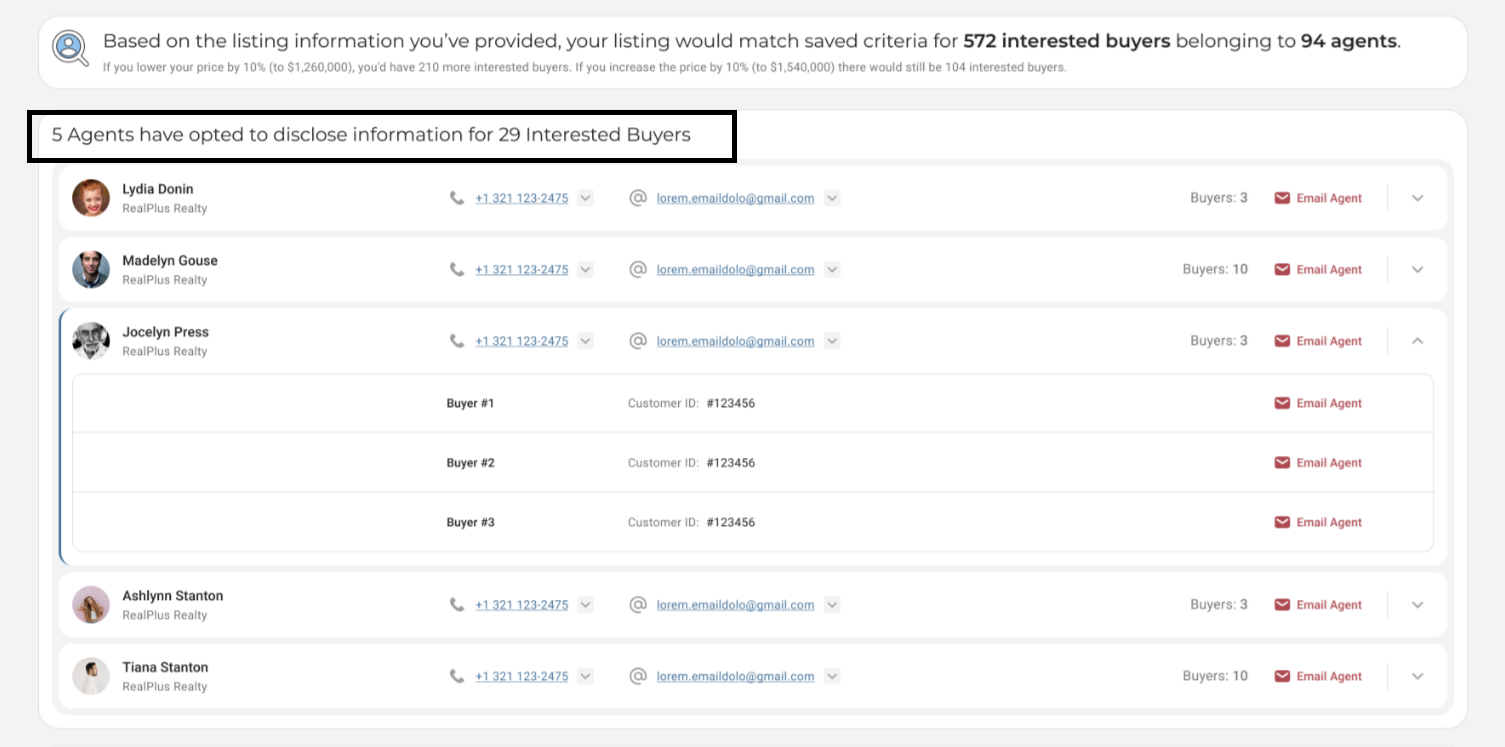
The results with interested buyers provide you with the names and contact information of agents with current customer-saved searches who directly match the listing or the provided criteria for a future listing.
Potential Buyers
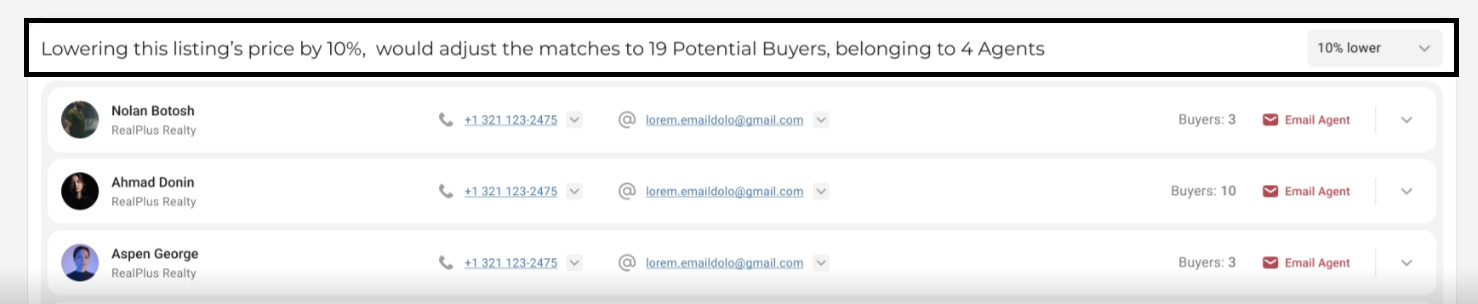
The results with potential buyers provide you with the names and contact information of agents with current customer-saved searches who would potentially match the listing or the provided criteria for a future listing if the price point were changed. Included in these results is a filter to test a range of pricing.
Privacy Rules
The goal of this feature is to offer seller agents the most direct path possible to connect with buyer agents. This is achieved by leveraging saved search criteria and matching them directly to listings.
At no point in this process is customer information ever shared. Seller agents will only be provided with direct-to-agent contact information.
Unique identification numbers will be provided to seller agents for reference in any correspondence with buyer agents. Buyer agents can discreetly search for their customers in the customers module using this unique ID to determine which customer matches the listing in question. Customer identification numbers will be displayed on all customer screens and profiles for buyer agents.
This concept and tool is also known as “Reverse Prospecting” in MLS markets. Our privacy rules adhere to established industry standards.
